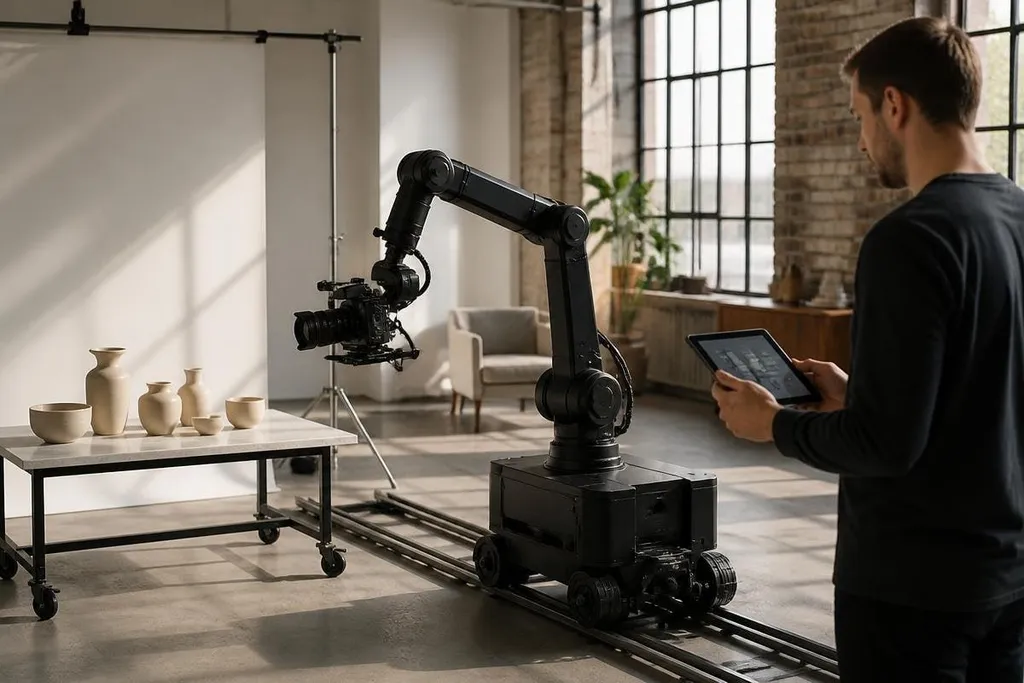
A photography robot can move a camera, repeat a shot, and keep the framing steady while a person works elsewhere. That changes the job from holding the camera to planning the movement, checking the scene, and deciding when automation should stop.
- Robotic arms repeat camera paths with the same framing.
- Gimbals keep the lens level while the platform moves.
- Teleoperation lets a person control the shot from another place.
How the robot moves the camera
Most photography robots use an arm, a mobile platform, or a camera gimbal. A gimbal is a motor-driven mount that keeps the camera pointed in a chosen direction while the robot turns or travels.
The robot follows a planned path through software. That path can include the camera’s position, speed, lens direction, and focus point. A camera operator can set these moves by hand, record them, then run the same sequence again.
Repeatability matters when a production needs matching frames. Product images, stop-motion scenes, visual effects plates, and studio interviews may need the camera to return to the same position after a change on set. A robot can store that position as data rather than relying on tape marks and memory.
The camera still needs a person who understands light, composition, focus, and timing. Software moves the hardware, but it doesn’t decide whether a face is well lit or whether a scene says what the director intends.
What changes on a film set
A robotic camera system can reduce the physical work around repeated shots. The crew can set a path once, check the result, and run it again after moving an actor, object, or light.
That process can help when the camera must pass close to a subject. A programmed arm can follow the same route at the same speed, while a technician watches the movement and uses an emergency stop if the path becomes unsafe. The safe path still depends on a clear work area, careful setup, and tested limits.
Some systems use sensors such as LiDAR or depth cameras to understand nearby objects. LiDAR measures distance with light pulses, while a depth camera creates distance data across a scene. Those inputs can help a mobile camera avoid obstacles, but they don’t remove the need for a person to check the set.
Repeatable camera motion may matter more to a small studio than full autonomy. A robot can follow the same path across takes, while the photographer keeps control of the set and handles changes in lighting or talent. A dated robotics report from Robot24.com can place that split beside the robot’s control method and test result.
What stays with the photographer
The camera operator still makes choices that software cannot judge from position data alone. They choose the lens, exposure, light direction, frame rate, and moment of capture. A robot can repeat a move, but the move has to be worth repeating.
Teleoperation changes the setup in a different way. The operator uses a controller or camera interface to guide the robot from another place. This can help with shots in hard-to-reach areas, but the video feed, control delay, and safety rules limit how far the operator can work from the camera.
There is also a cost in setup time. A moving camera needs a clear route, limits for each joint, cable management, and a way to stop the system quickly. If the scene changes often, manual camera work may be faster than teaching a new path each time.
I’d use a photography robot for repeatable motion first, not as a replacement for a camera operator.
What remains unproven
The category still has open questions for everyday media work. A product page may show a smooth camera move, yet that does not show how the system handles a crowded set, a loose cable, a change in lighting, or a person stepping into the path.
Buyers also need clear information about the full setup. The robot may be only one part of the cost. The camera mount, control software, safety equipment, training, support, and space around the arm can change the real price and working time.
A useful test should run the robot through the same task under changing conditions. Check whether it keeps the frame, stops safely, recovers from a pause, and lets the operator take control without delay.
A practical buying checklist
Before choosing a photography robot, check these points:
- Camera load: confirm the arm or gimbal can carry the camera, lens, battery, and accessories together.
- Path control: ask how staff record, edit, store, and repeat camera movements.
- Safety limits: check the emergency stop, speed limits, joint limits, and safe working area.
- Operator control: test the delay between the control input, the robot’s movement, and the camera feed.
- Set changes: find out how much work is needed when the subject, lights, or camera position changes.
- Full cost: include mounts, software, training, service, and any required floor space.
The best use is clear: repeated camera motion where matching frames matter. The open question is how often a production can repeat that move before a human operator becomes the faster tool.